.png)

Summary
- Digital signage is replacing outdated bulletin boards by offering dynamic screens that update in real time and better engage Gen-Z and Gen-Alpha students.
- Integrating live social media feeds transforms digital signage into authentic, constantly refreshing displays that showcase student voices, achievements, and campus life.
- Multi-platform social media embedding (Instagram, LinkedIn, Twitter, TikTok, YouTube) lets schools meet their community where they already share, enhancing relevance and participation.
- Using social-media-powered signage helps strengthen school culture and pride, improves sustainability by reducing paper use, and boosts operational efficiency via centralized content management.
Digital signage is quickly replacing bulletin boards in many schools and institutions. While they’re perfect for alerts and notifications, their applications go a lot further.
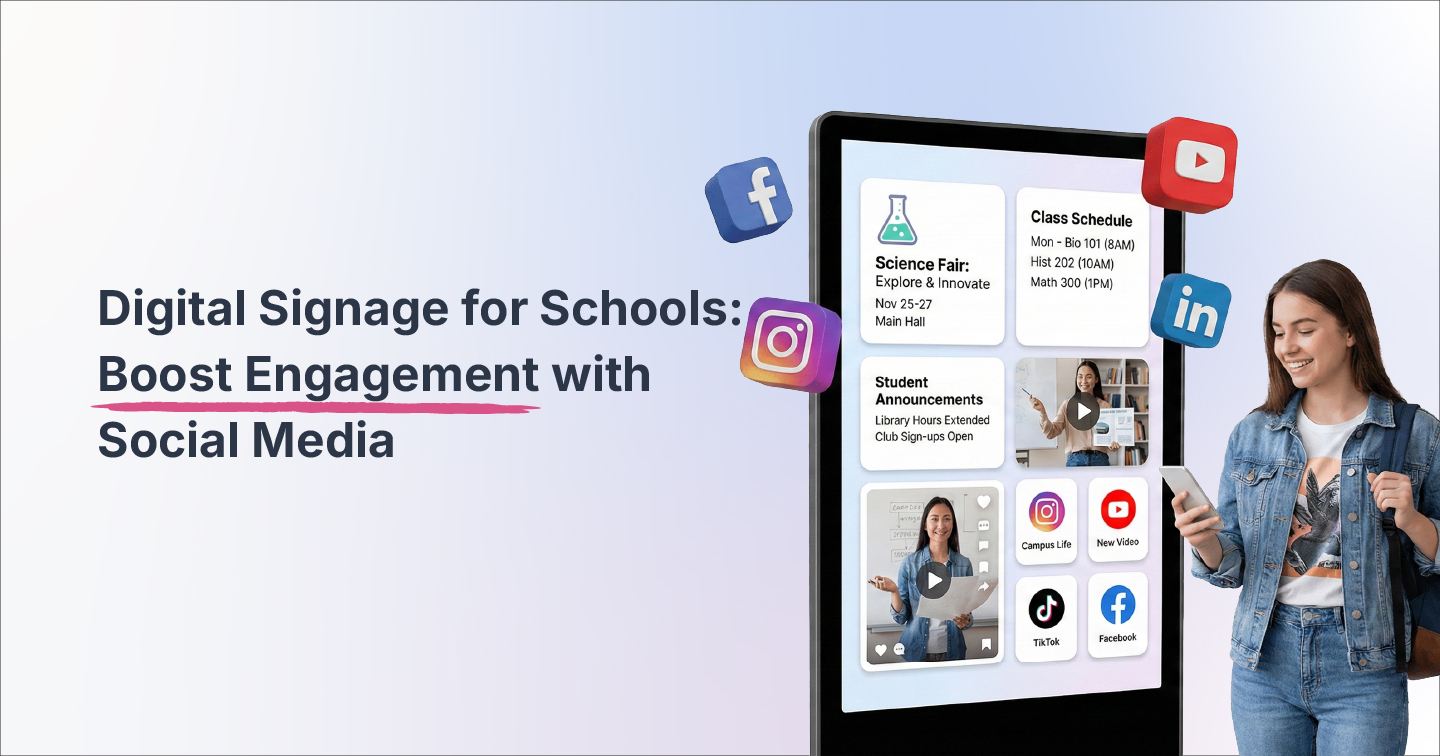
Digital signage in schools offers something bulletin boards never could: The chance to integrate social media and engage with today’s tech-savvy students.
By combining digital signage infrastructure with live social media feeds, schools can create authentic, constantly refreshing displays that showcase real student voices, celebrate achievements, strengthen community bonds, and keep content perpetually relevant.
We’ll show you how to strategically and ethically combine digital signage with social media, and why this integration matters for modern educational institutions while keeping student safety in mind.
Why Embed Social Media Into School Digital Signage?
Integrating social media content into your digital signage delivers measurable benefits that traditional static bulletin boards and signs simply cannot match.
Builds Social Proof and Authenticity
Digital signage placed across schools displays real posts from students, teachers, alumni, and faculty, not just institutional announcements. This adds a layer of authenticity that students can relate to dramatically increasing engagement.
Content such as celebrating student achievements, showcasing project photos, highlighting club activities, and featuring event moments through UGC content strengthens your school's brand identity while building genuine community connections.
This authentic social proof is also important for prospective students and their families visiting the campus. Seeing real student experiences displayed throughout campus facilities creates trust compared to generic marketing materials and brochures.
Keeps Content Fresh and Dynamic
A live and dynamically updating social media feed that automatically refreshes with timely, relevant content can dramatically reduce the manual workload required to keep displays current.
Rather than tasking staff with creating and uploading new content daily, social walls pull fresh posts automatically based on hashtags, accounts, or curated sources you've pre-approved.
Allows you to incorporate content from multiple channels
We all know Gen-Z and Gen-Alpha students change social media platforms faster than they change their lingo. Keeping up and integrating these can be a hassle.
Digital signage for schools powered by the right embedding software allows you to embed multiple platforms, such as:
- Instagram for visual student life
- LinkedIn for alumni achievements
- Twitter(X) for real-time event updates
- TikTok for creative student content
- YouTube for sharing school videos and informative content
Integrating with all these platforms helps you meet your student community where they already create and share.
Supports school culture and pride
These days, many students and parents enjoy seeing their school featured positively on various online platforms, which gives it a strong digital identity.
Digital signage for schools with social integration can be a powerful tool for strengthening this very institutional identity. You can highlight different school events, such as club activities, academic awards, athletic victories, guest lectures, community service projects, and alumni success stories, visually across campus. These displays consistently reinforce your school's values, achievements, and community spirit.
Helps improve sustainability and operational efficiency
Schools that implement digital signage can dramatically reduce paper consumption. This sustainability can help achieve environmental goals, such as ESG, while reducing ongoing printing costs.
Additionally, centralized content management systems allow administrators to update multiple screens campus-wide from a single dashboard, eliminating the need to physically visit each location.
How to Create Digital Signage for Schools with Flockler
Implementing effective digital signage with social media integration requires strategic planning and the right tools. We’ll show you how to build one with Flockler. Sign up for Flockler’s 14-day free trial and get started now!
1. Audit Your Signage Infrastructure
Begin by assessing your current state. What screens do you currently have installed? Where are they positioned throughout campus? Which displays serve common areas (entrances, cafeterias, student lounges) versus classrooms or administrative spaces?
Understanding your existing infrastructure helps you prioritize deployment and determine which screens are best suited for social media integration versus traditional announcements.
2. Define Your Content Strategy
Establish clear guidelines for what content appears on your displays and how it's sourced:
- Social media channel selection: Choose which platforms you will aggregate content from. This can come from Instagram, LinkedIn, Twitter, and TikTok, based on what you aim to accomplish with your digital signage.
- Update frequency: Choose the rate at which your Social walls will update in real time. This can vary at different locations.
- UGC acceptance criteria: Establish clear parameters around appropriate content, required hashtags, and submission guidelines.
- Content mix: You can balance social media feeds with traditional announcements, emergency information, wayfinding, and institutional messaging.
3. Set Up Social Walls and Feeds with Flockler
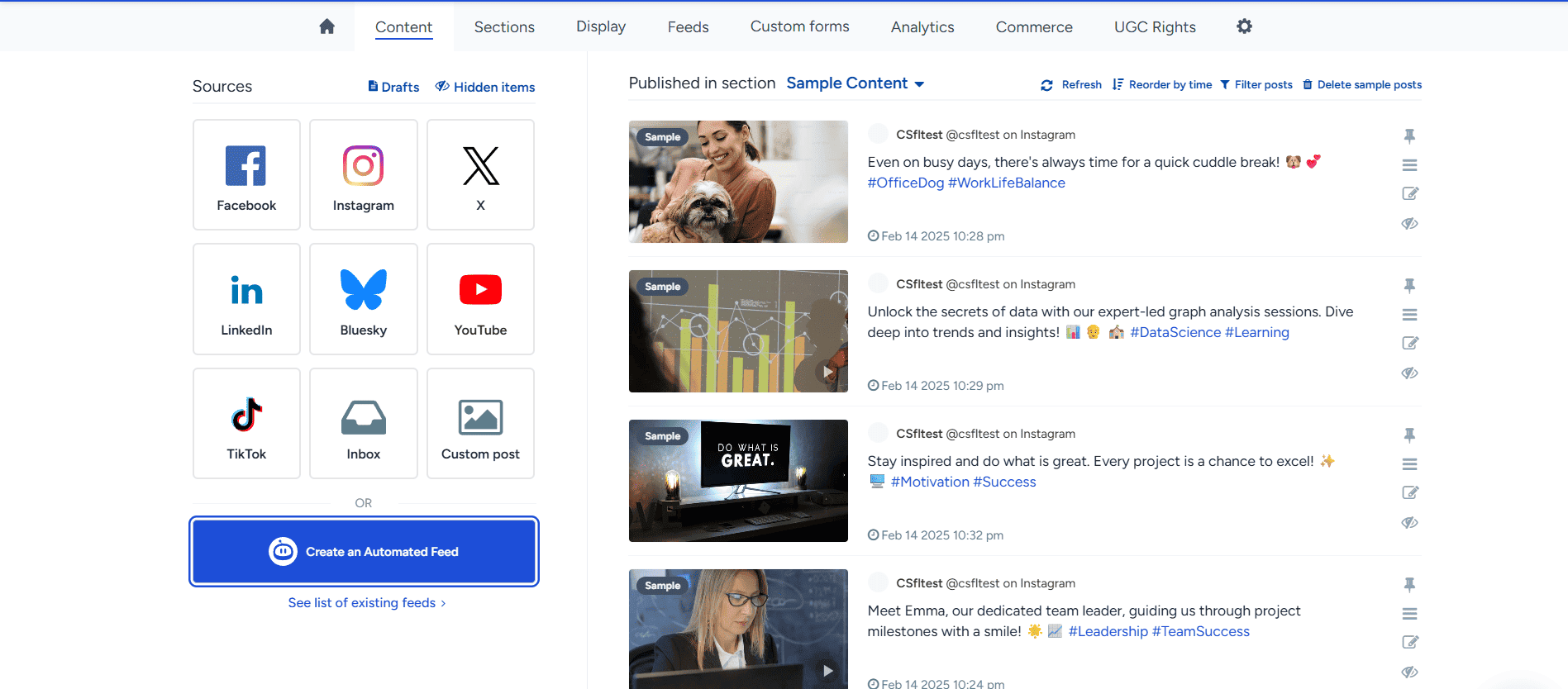
Open the Flockler dashboard and begin aggregating social media posts. You can filter by hashtags, by specific accounts (official student organizations, verified faculty), or by curated groups that combine multiple sources.
💡Tip: Create and choose layouts, styles, fonts, and colors that match your institution’s brand identity and physical display zones.
4. Embed, test, and deploy your feed on digital signage
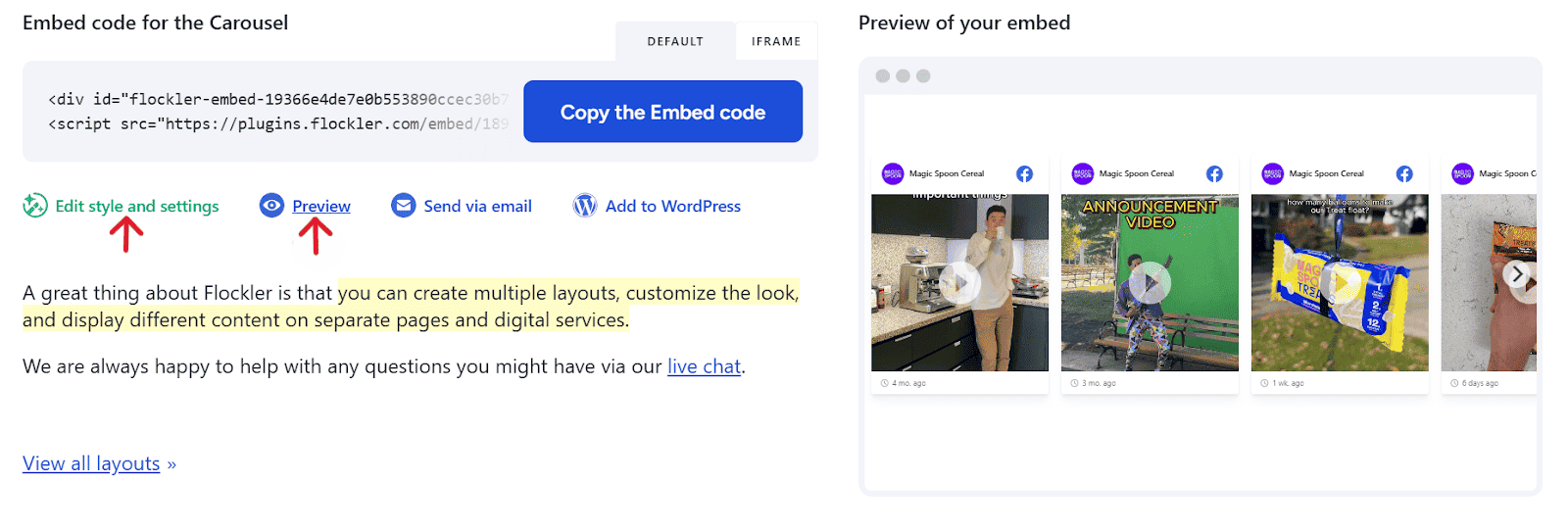
Connect your signage media players and display devices to Flockler by using the embed code. Test the display by changing the feed style, then select the most appropriate one based on the requirements. Remember to assign specific feeds and layouts to appropriate screens based on location and target audience. For example:
- Entrance displays can showcase alumni and university achievements
- Cafeteria screens could highlight student life and social media buzz
- Hallway displays near academic departments can feature schedules and event information.
5. Ensure stringent moderation
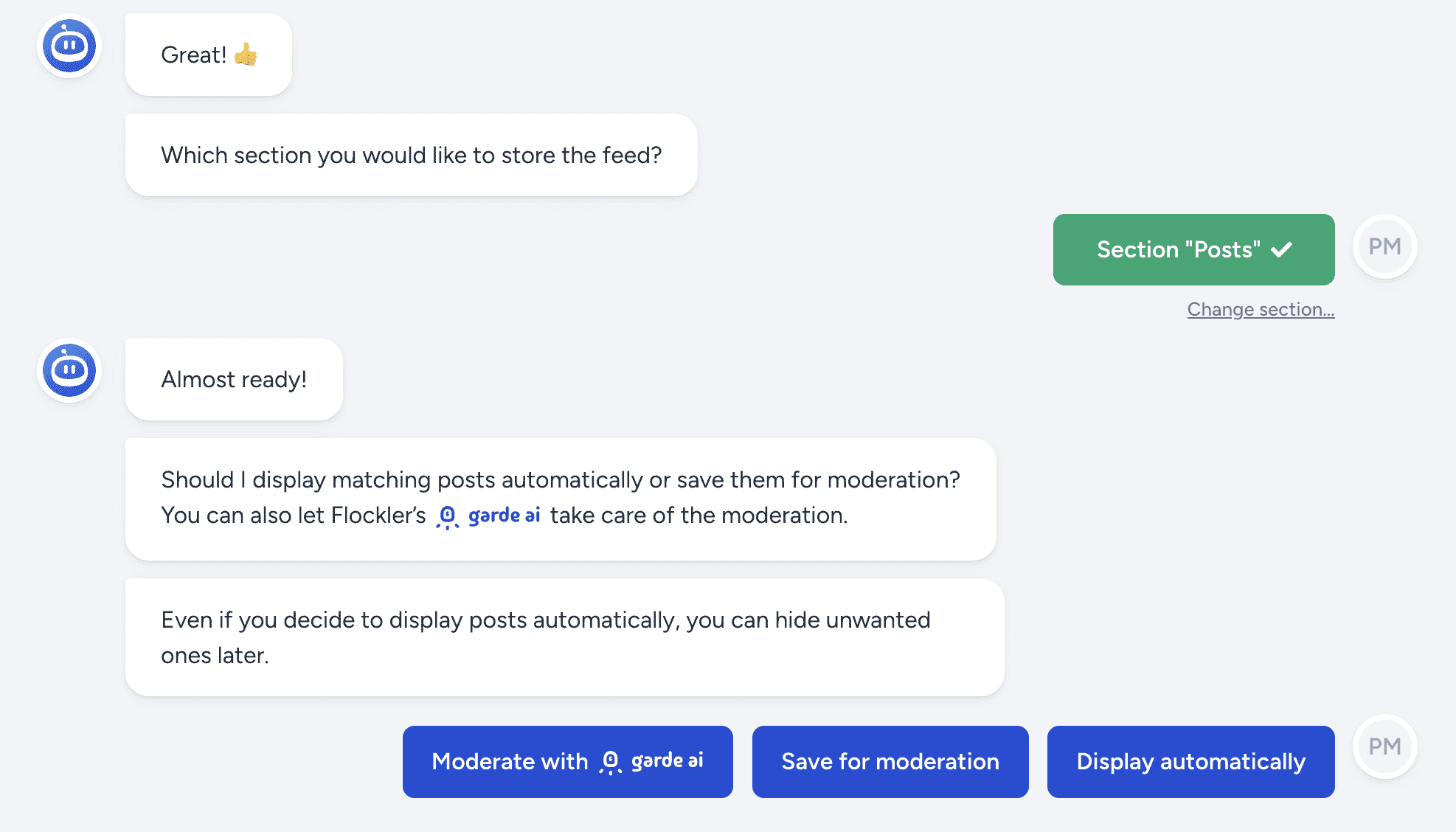
One step you cannot afford to overlook is establishing a clear moderation workflow in which submitted content enters a queue for review before appearing on screens. You can also automate this process with Flockler’s state-of-the-art Garde AI content moderation systems.
Provide training on what constitutes appropriate content, how to use hashtags effectively, and how the moderation system works. This distributed approach reduces bottlenecks while maintaining quality control and brand safety.
Primary use cases for digital signage in schools
Understanding where digital signage with social integration delivers maximum value helps prioritize implementation. Here are some of the most common use cases.
Announcements and Daily Communication
Display class schedules, cafeteria menus, event reminders, deadline notifications, and weather alerts. Augment these practical announcements with related social content such as student Instagram stories about today's lunch special, candid photos from yesterday's assembly, or countdown posts for upcoming events.
School Spirit and Student Recognition
Showcase your social media feed that highlights student artwork, academic achievements, athletic victories, scholarship recipients, and honor roll lists. Create social walls featuring student Instagram or LinkedIn posts celebrating school pride, teacher spotlights highlighting exceptional educators, or alumni sharing career milestones that inspire current students.
⚡Real-life example:
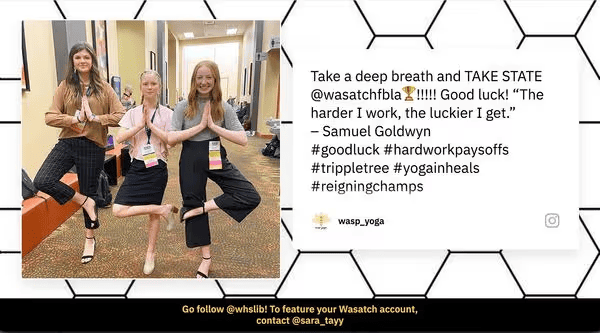
Wasatch High School builds engagement using social media displays such as TVs and digital boards on campus. By linking it with Flockler’s dynamic Instagram feed, the latest posts from the school and students build engagement and grow the sense of community.
Safety and Emergency Alerts
You can override regular content on your digital signage to broadcast critical alerts, evacuation routes, weather information, closures, or safety instructions. Modern digital signage systems integrate with CAP-compliant alert systems to deliver real-time safety messaging to students wherever they are on campus.
💡Related: Learn how Schudio used Flockler’s embedding software to help increase enrollment rates by 30%.
Wayfinding and Campus Navigation
By displaying interactive digital maps, building directories with safety information, and class schedules with a room finder, large campuses can help ease newcomer or visitor anxiety.
Tip: Combine maps and guides with embedded social media feeds featuring snapshots of campus life, events, or student-led virtual tours to increase engagement.
Event Promotion and Recap
Create live social walls for major school events such as open houses, sports competitions, theatrical performances, or academic showcases. Encourage attendees to post with event-specific hashtags, then display this real-time content on screens throughout the venue.
After events conclude, continue showcasing highlight reels via aggregated Instagram, Twitter, and TikTok content, extending event impact and building anticipation for future gatherings.
Important factors to consider when implementing school digital signage
Schools must adhere to strict standards when implementing Digital signage to prioritize student safety. Here are some challenges and how you can tackle them:
Content Moderation and Brand Safety
Challenge: Ensuring only appropriate, on-brand content appears on displays without creating an overwhelming moderation burden.
Solution: Implement clear moderation workflows with defined roles. Use Flockler's AI-assisted filtering to automatically flag potentially problematic content, establish keyword-based auto-approval for trusted sources, and designate multiple moderators across departments to distribute workload and ensure timely review.
Remote Management and Scheduling
Challenge: Updating multiple screens across large campuses efficiently.
Solution: Implement scheduling by time (different content during class hours vs. after school) and by zone (cafeteria content differs from library displays).
Technology Infrastructure Requirements
Challenge: Budget constraints, outdated equipment, or insufficient network infrastructure.
Solution: Start small with pilot implementations in high-traffic common areas. Demonstrate ROI through paper savings, reduced administrative time, and improved engagement before expanding. Many schools successfully justify digital signage through sustainability grants, educational technology funding, or by reallocating printing budgets.
Privacy, Consent, and Compliance
Challenge: Protecting student privacy while showcasing authentic content.
Solution: Establish clear UGC policies requiring consent for content featuring identifiable students. Implement FERPA compliance measures (in the US) or GDPR requirements (in Europe) as applicable. Create submission forms that include explicit consent acknowledgment, and provide easy mechanisms for students or parents to request content removal.
‼️Remember: Focus on content students voluntarily post publicly on social media, using appropriate hashtags, rather than repurposing private communications without permission.
How to choose the best digital signage solutions for schools
Digital signage integrated with social media content represents the future of school communication. Flockler specifically addresses the unique challenges educational institutions face when implementing social media-integrated digital signage:
Seamless Multi-Platform Aggregation: Pull user-generated content from Instagram, LinkedIn, Twitter, TikTok, Facebook, and YouTube into unified feeds or walls to capture authentic student voices regardless of which platforms they prefer, all in a single interface. What’s more, you can control multiple screens from a single dashboard!
Industry-leading Moderation Tools: Helps you curate only relevant, appropriate content before it appears on displays. With AI-assisted filtering flags potentially problematic posts, keyword-based rules automatically approve trusted sources.
Extensive customization options: Choose from grid, carousel, masonry wall, or slideshow layouts optimized specifically for digital signage displays and customize every detail to your brand’s liking.
Real-Time Automatic Updates: Content refreshes automatically as new posts appear on connected social channels, eliminating the need for manual uploads.
Comprehensive Analytics and Reporting: Track which posts are displayed most frequently, how the content mix evolves, which sources provide the most valuable material, and overall engagement patterns to maximize ROI.
Want to experience firsthand how easy it is to create engaging social walls for your school's digital signage? Sign up for a free 14-day trial, no CC required.
FAQs
How do we ensure only appropriate content appears on school displays?
Flockler provides multi-layered content moderation, including Garde AI, an AI-assisted filtering system that flags potentially problematic content; keyword-based auto-approval rules for trusted sources; manual moderation queues where staff review posts before display; and the ability to instantly hide or remove any content that shouldn't have appeared.
What happens if a student posts something inappropriate with our school hashtag?
Content doesn't appear on displays automatically. Posts enter a moderation queue where designated staff review them before approval. Even if content is initially approved, moderators can instantly hide it from all screens with one click.
Can we display different content on screens in different locations?
Yes. Flockler allows you to create multiple feeds with different content sources, then assign specific feeds to specific screens or screen groups. Your cafeteria displays might show student life content, while administrative-area screens focus on academic achievements.
How much does it cost to implement digital signage with social media integration?
Costs vary based on your existing infrastructure. If you already have screens and media players, Flockler's social wall platform starts at affordable monthly rates. Many schools offset costs through reduced printing expenses, and some qualify for educational technology grants or sustainability funding.
Do students need to do anything special for their posts to appear?
Students simply use designated hashtags (such as #YourSchoolPride) when posting on their personal social media accounts. You can also aggregate content from specific accounts, like official student organizations. Clear communication about which hashtags connect to displays encourages participation.